Connect to a Raspberry Pi
Overview
So far in this guide series, we have been working with the iChidori-Crest connected to a PC for quick evaluation. This guide explains how to use iChidori-Crest with a Rasberry Pi.
The iChidori-Crest connects to the Raspberry Pi through its 40-pin GPIO header. For pin mapping details, see 40-Pin Header Assignments.
In this guide, we will use the USB interface of the mosaic-G5 receiver. The Raspberry Pi communicates with the mosaic-G5 via USB, while MRTKLIB's mrtk relay is used to stream NTRIP corrections to the receiver and attempt to achieve an RTK Fixed solution.
About MRTKLIB: Modernized RTKLIB for Next-Generation GNSS
This guide uses mrtk relay from MRTKLIB — a modern GNSS positioning library built on RTKLIB, adding PPP, PPP-AR, and PPP-RTK (CLAS/MADOCA) support. If you have not yet installed MRTKLIB, refer to the MRTKLIB Documentation before proceeding.
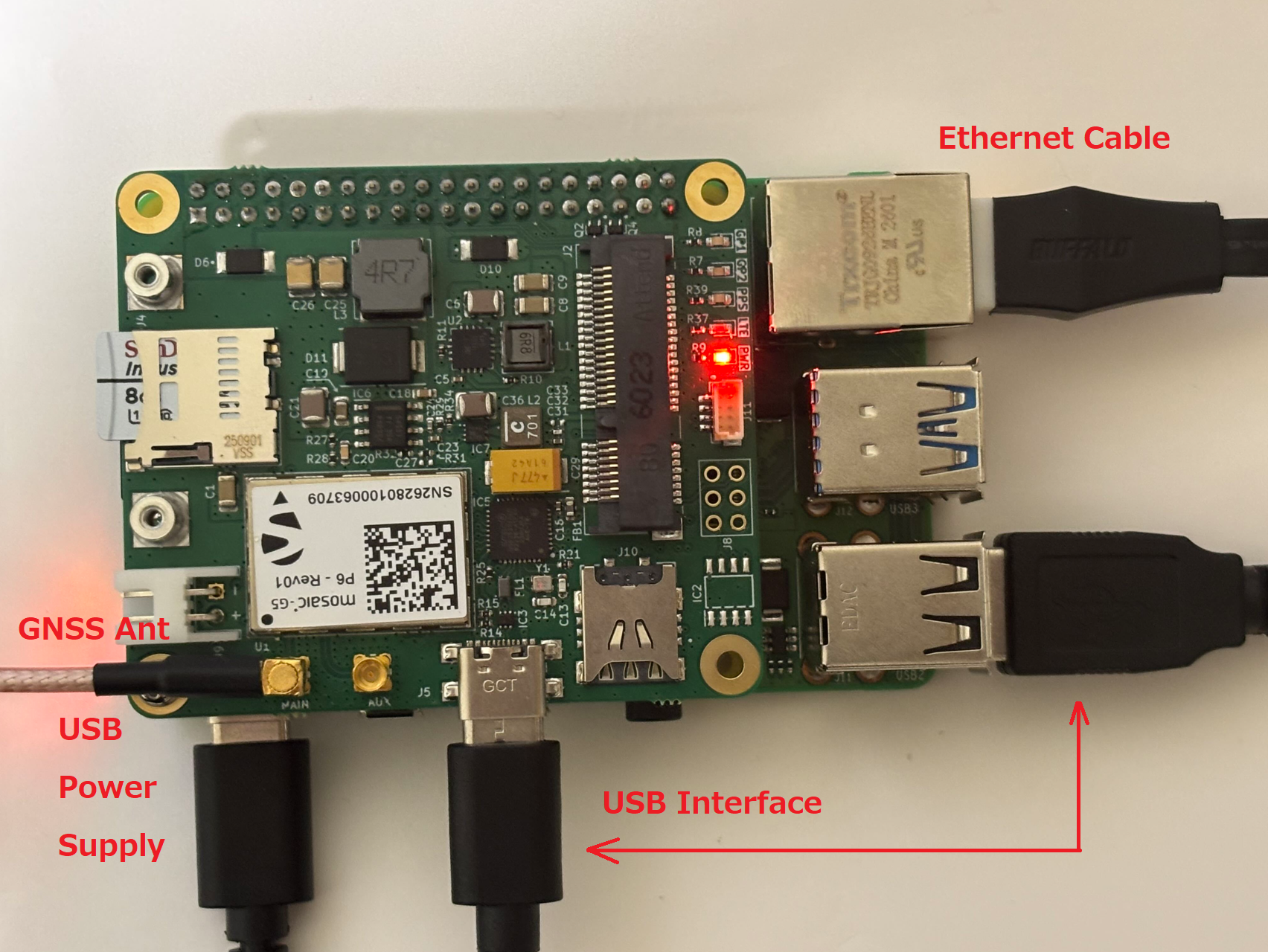
Step 1 — Configure mosaic-G5 USB Output
Note
This step configures additional data outputs for monitoring and post-test analysis. It is recommended for evaluation purposes.
Open RxControl and establish a connection with the mosaic-G5 (see Basic Setup if needed).
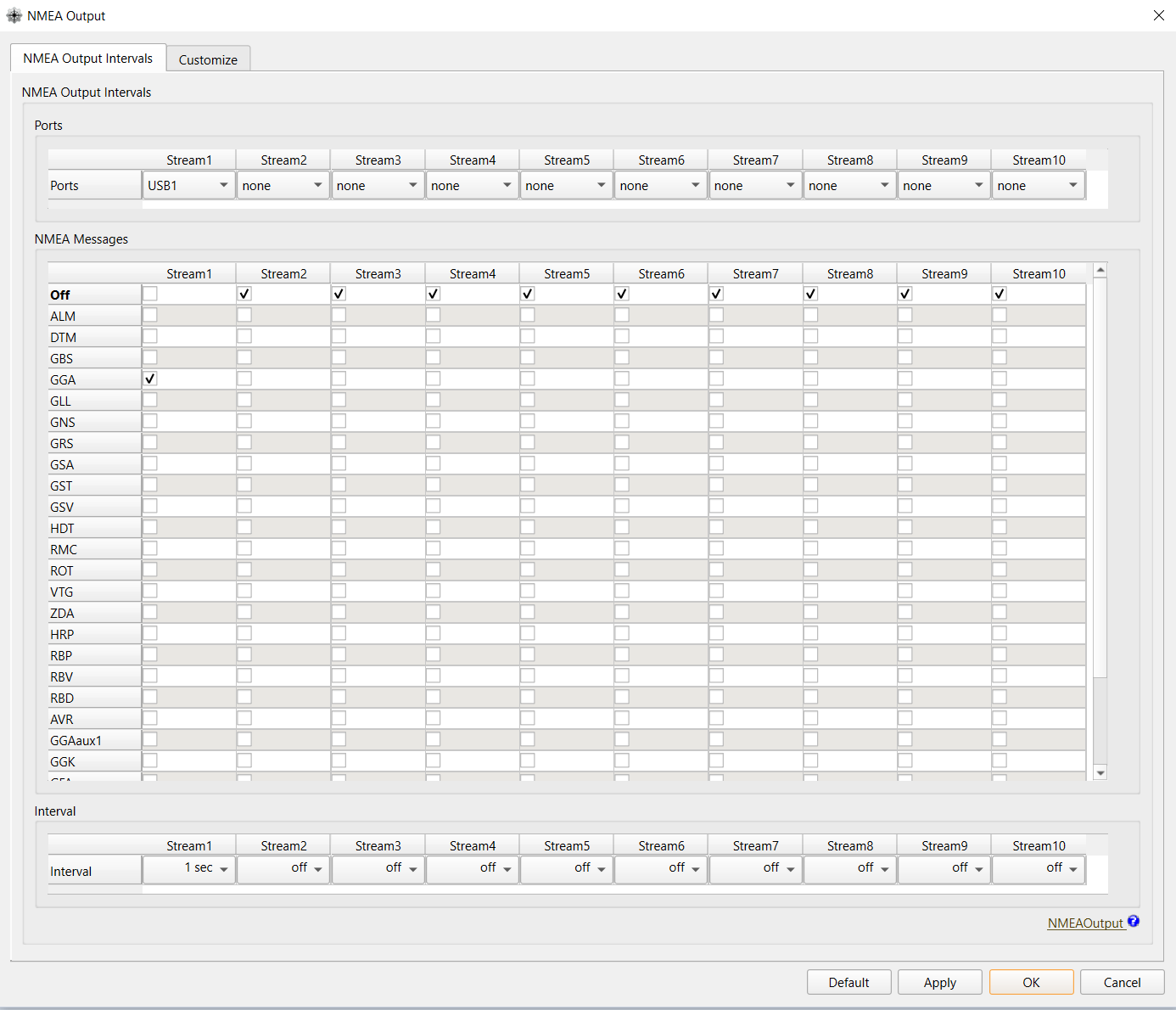
Navigate to Communication → Output Settings → NMEA Output and configure Stream 1 as follows:
| Field | Value |
|---|---|
| Port | USB1 |
| Message | GGA (or as required) |
| Interval | 1 sec (or as required) |
Next, navigate to Communication → Output Settings → SBF Output and configure Stream 1 as follows:
| Field | Value |
|---|---|
| Port | USB2 |
| Blocks | PVTGeodetic, MeasEpoch (or as required) |
| Interval | 1 sec (or as required) |
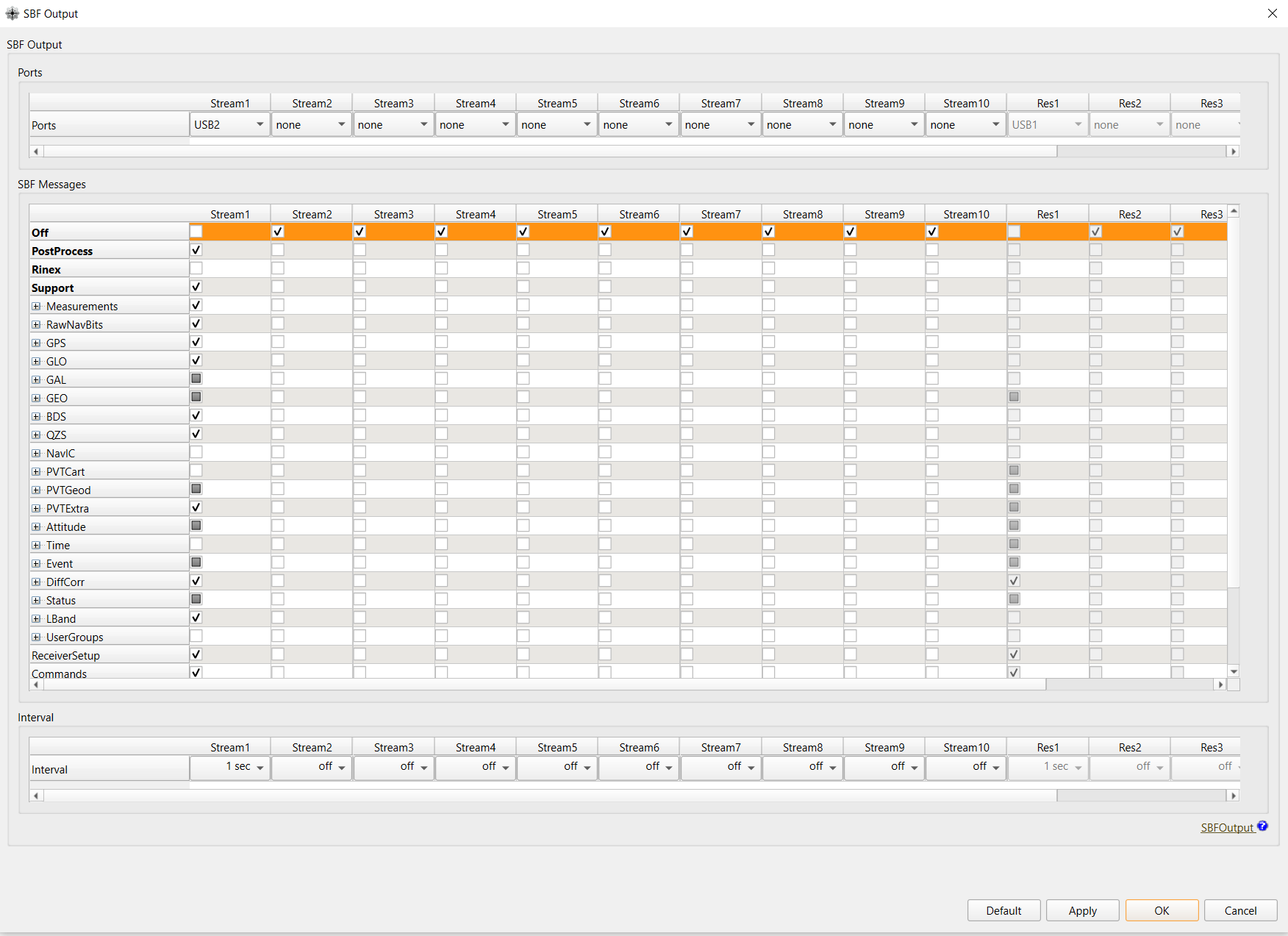
Click Apply and OK after each setting.
Don't forward to Save to boot configuration for the next power cycle.
Step 2 — Verify mosaic-G5 USB Ports on Raspberry Pi
With the iChidori-Crest attached on Raspberry Pi and powered, the mosaic-G5 will enumerate two USB serial devices on the Raspberry Pi. These correspond to the USB1 and USB2 ports configured in the previous step.
SSH into the Raspberry Pi and run the following command to confirm both ports are detected:
If the devices do not appear, check that the USB-C cable between the iChidori-Crest and the Raspberry Pi is connected.
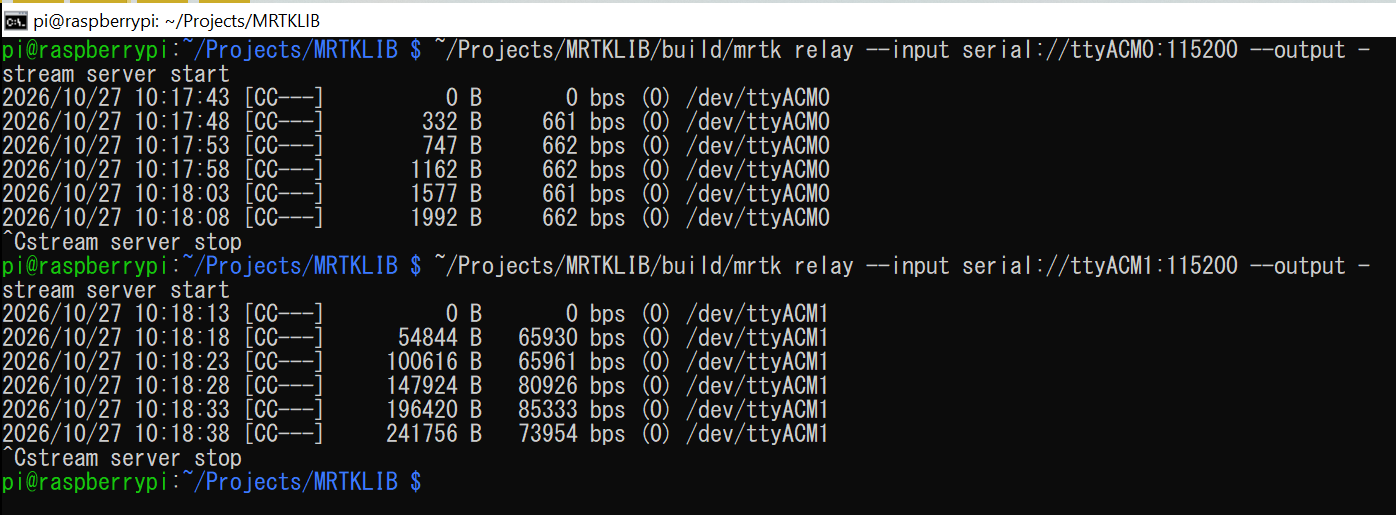
Verify the USB data stream
Before proceeding to the next step, confirm that data is actively streaming from both USB ports. Use mrtk relay to read directly from each serial port and print the output to the terminal:
You should see SBF/NMEA sentences scrolling continuously in the terminal like this terminal image:
Step 3 — Forward NTRIP Corrections to mosaic-G5
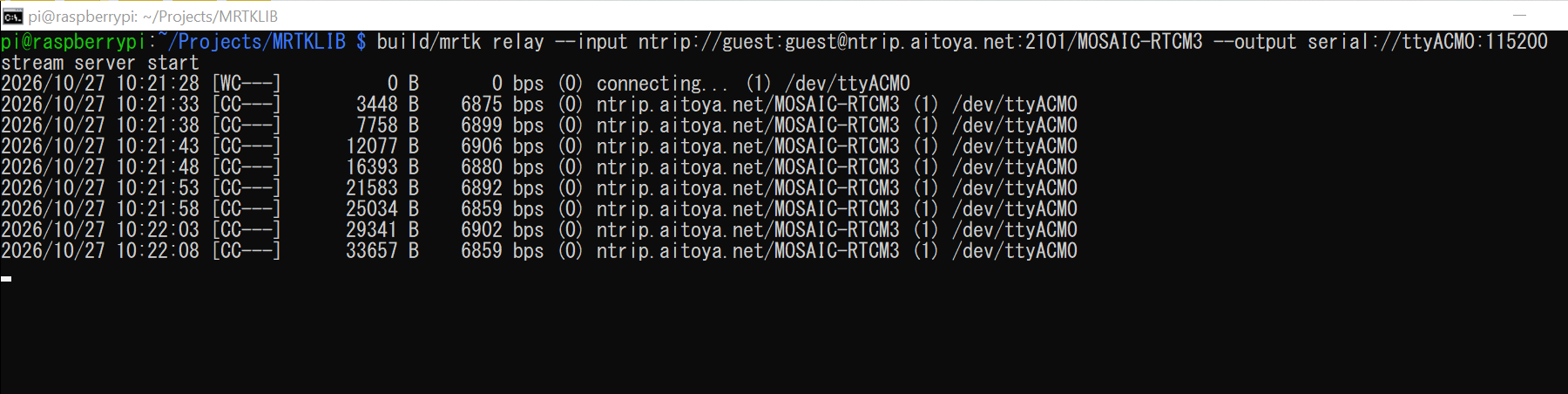
With the data streams verified on USB ports, we can now stream RTCM3 correction data from an NTRIP caster to the mosaic-G5 receiver via ttyACM0:
~/Projects/MRTKLIB/build/mrtk relay \
  --input ntrip://guest:guest@ntrip.aitoya.net:2101/MOSAIC-RTCM3 \
  --output serial://ttyACM0:115200
Use your own NTRIP caster
The example above uses the Aitoya NTRIP caster for reference. Replace the host, port, mountpoint, username and password with your own caster credentials before running.
Once running, mrtk relay will continuously receive RTCM3 packets from the caster and forward them to the mosaic-G5 in real time. Leave this process running in the terminal and open a new terminal window to proceed to the next step.
Step 4 — Verify RTK Fix
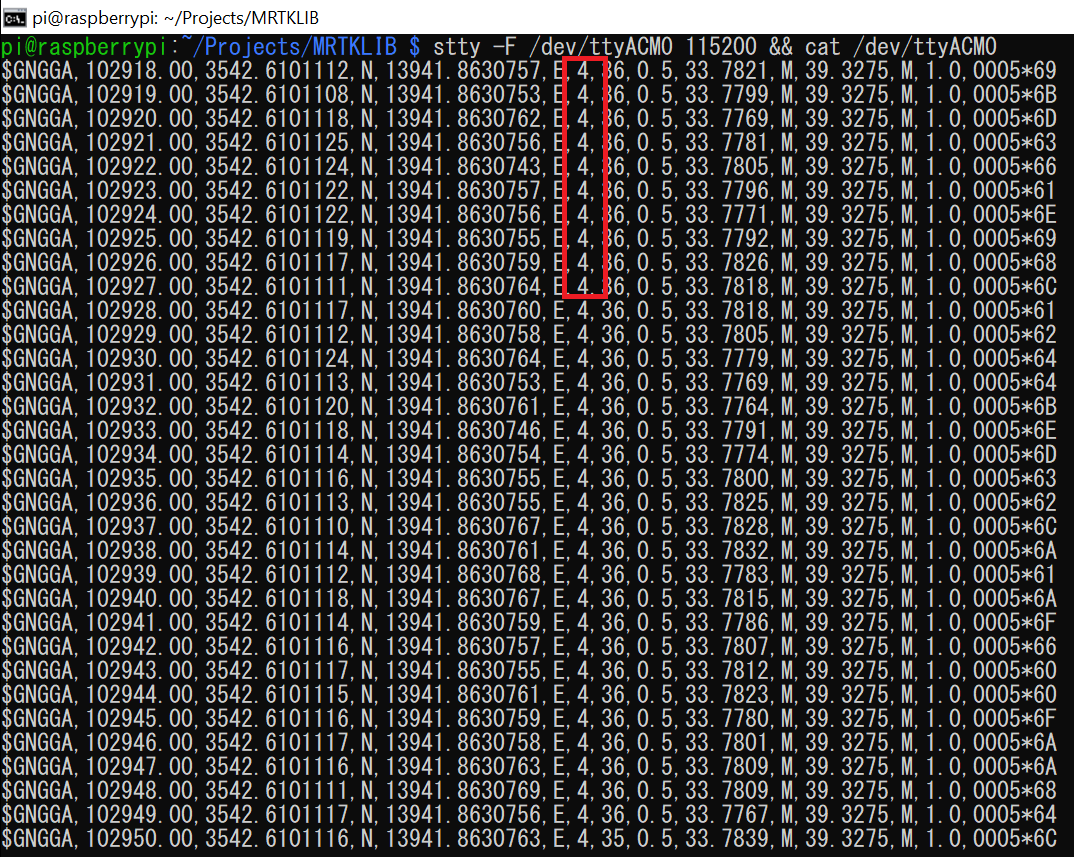
With NTRIP corrections streaming to the mosaic-G5, the receiver will begin processing them and improve its position solution — RTK Fixed. Open a new terminal and monitor the NMEA GGA output to track the fix status:
Watch the fix quality field in the $GNGGA sentence (the 6th comma-separated value):
| Fix Quality | Status |
|---|---|
| 0 | No fix |
| 1 | Standalone GNSS fix |
| 2 | DGPS fix |
| 5 | RTK Float — corrections received, ambiguity not yet resolved |
| 4 | RTK Fixed ✓ — centimeter-level accuracy achieved |
RTK Fixed GGA output:
Note
At this point, the mosaic-G5 is outputting NMEA and SBF data via USB in RTK Fixed state. If you wish to log this data for further evaluation, you can use mrtk relay to capture each stream to a file:
Summary
This article demonstrated how to use the iChidori-Crest + Raspberry Pi as an RTK rover, receiving NTRIP corrections over the network and achieving a centimeter-level RTK Fixed solution.
The procedure covered:
- Configuring the mosaic-G5 USB output for NMEA and SBF data streams for data logging purpose.
- Verifying USB serial port detection on the Raspberry Pi.
- Forwarding RTCM3 corrections from an NTRIP caster to the mosaic-G5 using
mrtk relay. - Monitoring NMEA GGA output to confirm RTK Fixed status.
With RTK Fixed achieved, the iChidori-Crest is ready for field deployment in applications requiring centimeter-level positioning accuracy.